Fits the systems you already use.

Signed letters go out as HL7 v2 through Medical Objects, so correspondence reaches the practice's clinical inbox.

How delivery actually works.

One letter, from your signature to the acknowledgement that comes back. Each step is a real mechanic, not a promise.

  • Sign You sign, then it sends. Nothing transmits while it is a draft. The letter leaves aurii only once you have read it and put your name to it, so what lands at the practice is the version you approved.
  • Send Sent as HL7 v2 through Medical Objects. The letter goes out as a structured HL7 v2 clinical message, the format the receiving software files natively, rather than a PDF someone has to re-key. Medical Objects carries it over its secure network, encrypted in transit.
  • Ack The acknowledgement comes back to you. When the receiving system accepts the message it returns a delivery acknowledgement, and aurii records it against the letter, so each one carries a status you can see: sent, delivered, or needs attention. You are not left wondering whether it arrived.
  • Fallback Secure email when the practice is not on the network. If a referrer does not receive over Medical Objects, aurii falls back to secure email so the letter still has a way to arrive. A letter is never stranded because the far end runs different software.
  • Filed What the GP sees. The letter appears in their own clinical inbox, addressed and structured the way their system expects, filed against the right patient. No fax to scan, no attachment to chase.
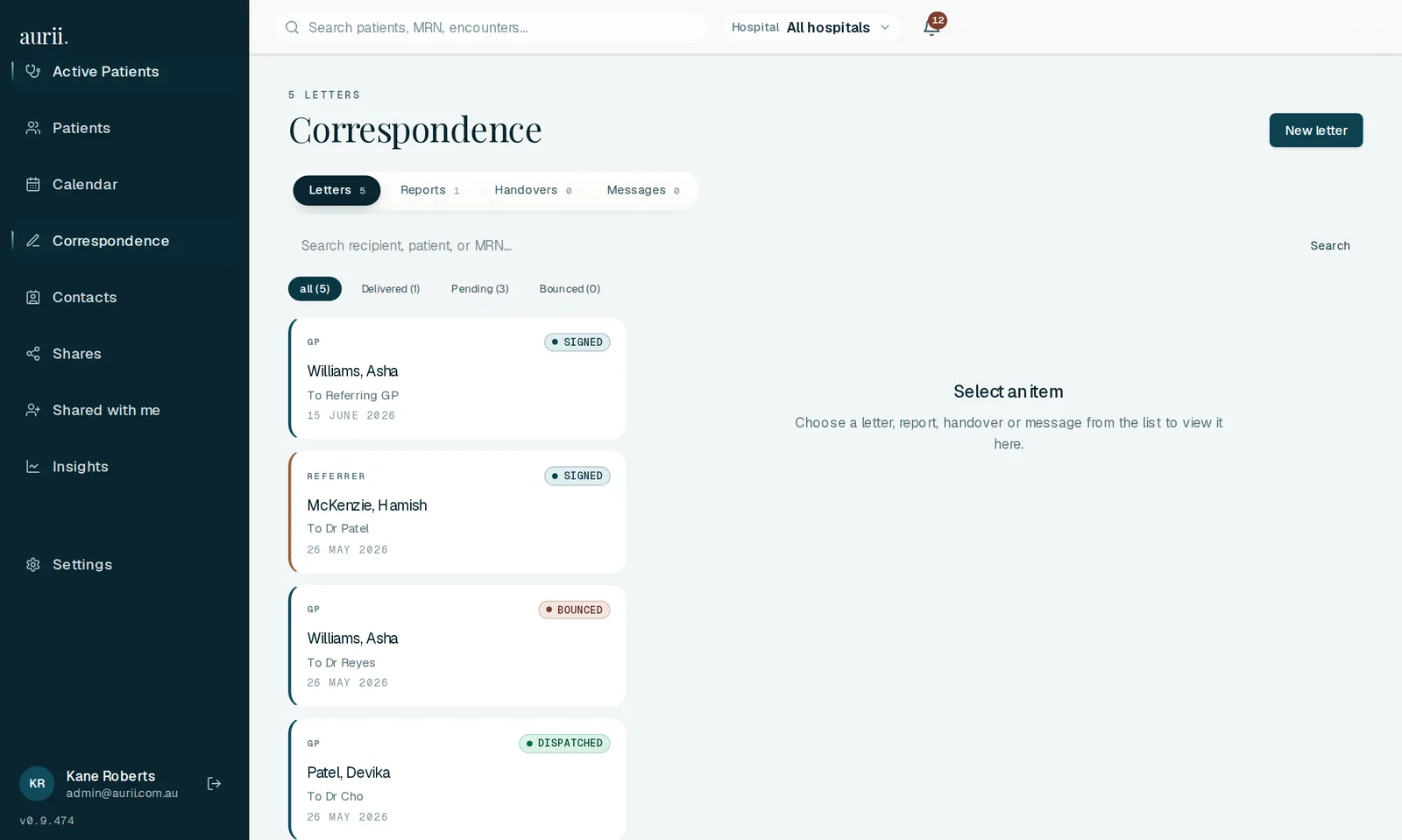
Screenshot of aurii's correspondence view showing outgoing letters with a per-letter delivery status column: sent, delivered and acknowledged.

The correspondence view, shown on a demo patient. Each letter carries its own delivery status, tracked back from the receiving system.

Where letters can land.

The honest answer to "do you work with our systems?" is that aurii delivers through the Medical Objects network, and that network reaches the software most Australian practices run.

Rather than build a separate connector for each practice-management system, aurii hands the letter to Medical Objects, whose network delivers into the clinical software most Australian practices already use, including:

  • Best Practice
  • MedicalDirector
  • Genie
  • Zedmed
  • Gentu

These, and others on the Medical Objects network, are destinations reachable through Medical Objects, not direct aurii integrations. Which of them a given referrer can receive on depends on how their own practice is set up, so the reach here is Medical Objects' network reach, documented on their site. Your referrers' setups vary, and we check yours with you during onboarding.

Medical Objects' connected software

A referrer letter goes out after every review on the specialty pages too: see how it fits a cardiology or general medicine round.

What comes back.

Being precise about the inbound direction matters more than sounding connected. Here is exactly what enters aurii, and what does not.

  • Acks Delivery acknowledgementsThe one thing that flows back over HL7 is the acknowledgement that a letter was received, which aurii records against the letter so its delivery status is always current. Acknowledgements are the whole of the inbound HL7 traffic: results do not arrive this way.
  • Results Pathology & imaging results, by uploadUpload a pathology or imaging report, confirm the extracted values, and they land on the patient's timeline, flagged when they fall outside the reference range. Results enter aurii by upload and extraction, with you confirming what was read, not by a live feed.
  • Residency Your data stays in AustraliaEverything that enters or leaves runs on Azure in Sydney with a Melbourne backup, encrypted record by record in an Australian Key Vault and isolated to your practice. There is no offshore disclosure in the ordinary course.
Said plainly

There is no live two-way sync with a practice-management system or hospital EMR, and no results feed. Traffic runs one way: signed letters go out with their acknowledgements tracked, and results come in by upload. We would rather tell you that up front than let it surface after you have signed up. If a live integration is on your must-have list, tell us your setup and we will be straight with you about whether and when it fits.

Getting connected.

Three steps to your first letter landing where it should, handled with you rather than left as a ticket.

  1. We check your referrer mix

    On the fit call we go through the practices you write to most and how they receive correspondence. That tells us who is reachable over Medical Objects and who will take secure email.

    ~20 min · fit call
  2. Medical Objects registration, with you

    We handle the Medical Objects side of getting you sending, so your signed letters go out as HL7 v2 rather than as faxes. No standards knowledge required at your end.

    Handled with you
  3. First letter, tracked end to end

    You sign a real letter and we watch it the whole way: sent, delivered, acknowledged. Once you have seen one land, the rest are just your round.

    You review & sign

Tell us your setup and we will confirm the fit.

Now that you have seen how delivery works, the last question is your own referrer mix. Tell us the practice-management or hospital software your referrers use, and we will confirm exactly how aurii reaches them for you, including where secure email covers the gap.

  • Practice-management systemsVia Medical Objects · confirmed with you
  • Hospital EMRsTalk to us to confirm the fit
  • Secure-messaging networksMedical Objects today · others on request

Letters where they belong.
In the inbox, not the fax tray.

Tell us about your practice and the systems your referrers use, and we will show you exactly how aurii fits your round.

hello@aurii.com.au